Live interviews with AI scorecards
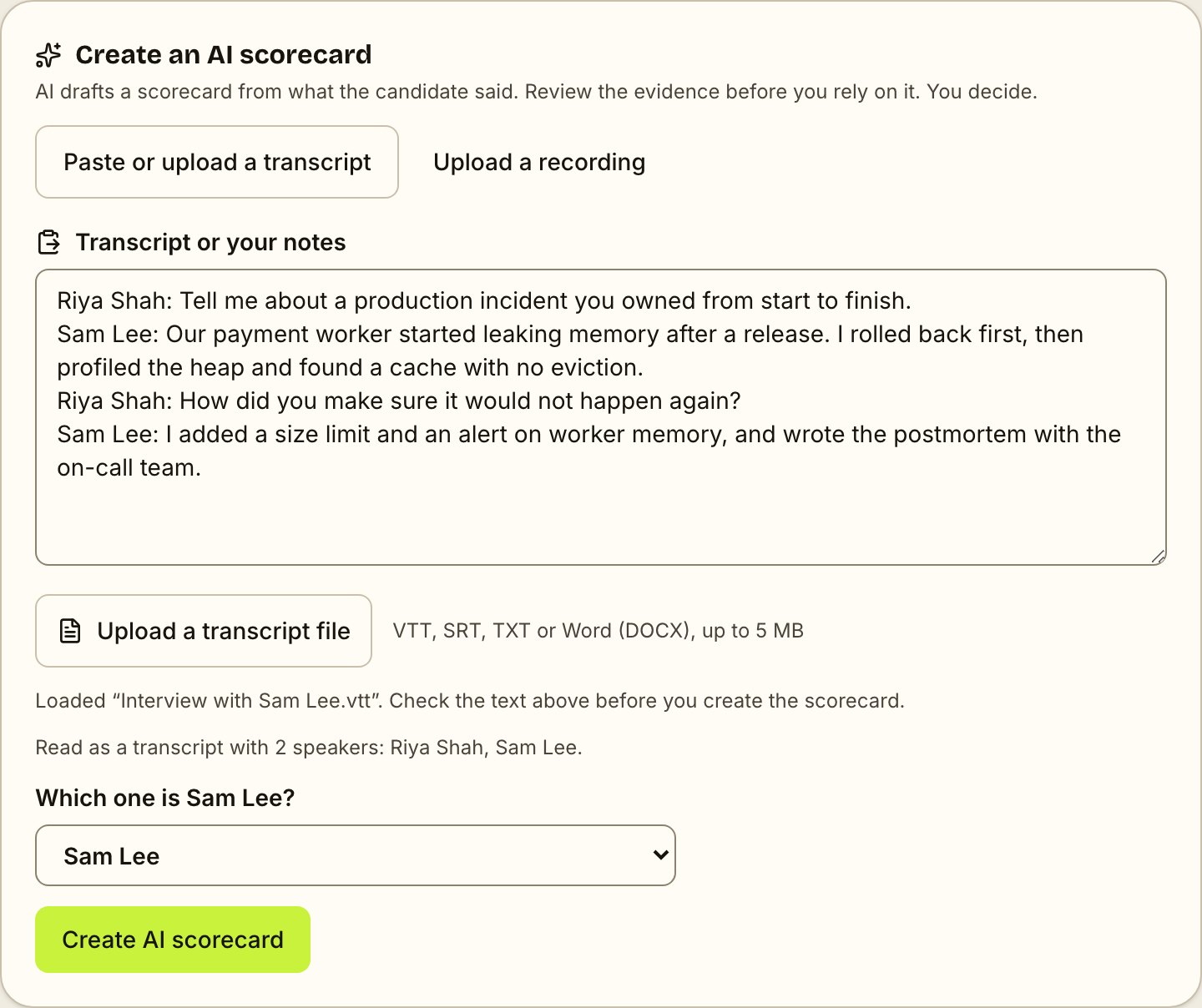
You run the interview, and AI writes it up. Hold the call on Zoom, Google Meet, Teams or any other tool, or on a Gaugely video call. Afterwards, upload or paste the transcript, or add your notes, and AI drafts a scorecard that quotes the candidate. No notetaker bot joins your call, and you make the decision.
- →A live interview can be the first step or any later round, with up to 5 interviewers
- →Use your own Zoom, Google Meet or Teams link, or a Gaugely video call in the browser on Pro
- →Set a time and calendar invites go to the candidate and every interviewer
- →Afterwards, upload the transcript file (VTT, SRT, TXT or Word) or paste it, and AI drafts the scorecard with quotes
- →No notetaker bot in the call: with transcription on, the candidate sees your call platform’s own notice, not an extra participant
- →No transcript? Paste your own notes (the scorecard says it came from notes), or upload the recording on Pro
- →The same rubric and evidence rules as AI interviews, and a person always makes the decision
Gaugely closes the loop: screen CVs → interview the best (voice or video) → compare scorecards → re-engage your past top candidates. No other tool feeds your own interview signal back into screening.
Questions
Can AI write up interviews I run myself?
Yes. After a live interview, upload or paste the transcript, or your notes, into Gaugely. AI drafts a scorecard against the job's rubric, quoting what the candidate said, and you review it before deciding.
Does a bot join my Zoom or Google Meet call?
No. Nothing joins your call. Afterwards you upload the transcript file Zoom, Meet or Teams already makes, or paste its text. If it labels who spoke, you pick which speaker is the candidate. You can also paste your own notes, or upload the recording on Pro.
Which transcript files can I upload?
VTT, SRT, TXT and Word (.docx) files up to 5 MB. That covers the Zoom transcript (.vtt), the Teams download (.docx or .vtt), a Google Meet transcript downloaded from Google Docs as Word or plain text, and other tools that export one of these formats. The file is read in your browser and its text appears in the box, so you can check it before the scorecard is made.
Can the first interview be a live call instead of an AI interview?
Yes. On any job, choose Add candidates, then Schedule a live interview. The candidate gets an email with how to join, plus a calendar invite once you set the time, and the AI scorecard works the same way as for later rounds.
Is a Gaugely video call recorded?
No. The call is turned into text as it happens, and only for people who agree before they join. No audio or video is saved. If the candidate says no, nobody on the call is transcribed.
Which plan do I need?
Live interviews and AI scorecards from a transcript or your notes are on every plan (on the Free plan, AI scorecards need a work email). Gaugely video calls and recording upload are on Pro and Scale.